Products
What it does
A product is a menu item as a customer would recognize it — "Iced Latte," "Butter Croissant," "Catan" — with a name, a description, a photo, and a category it belongs to. What a product does not carry is a single price or a single cost. Instead, a product declares its own options (like "Size" or "Temperature"), each with a set of possible values ("Small"/"Large", "Hot"/"Iced") — and every actual sellable combination of those values is a separate Product Variant, each with its own price and its own bill of materials.
A product also carries two distinct text fields that are easy to confuse with each other: description is a short, single-line, customer-facing blurb — it's the only product text shown in the table-ordering app. Recipe is the opposite: staff-only Markdown preparation notes (how to actually make the item), never sent to a customer's phone. Products and variants each have their own recipe, since preparation genuinely differs by size or option.
A product also has two flags that shape how it behaves downstream:
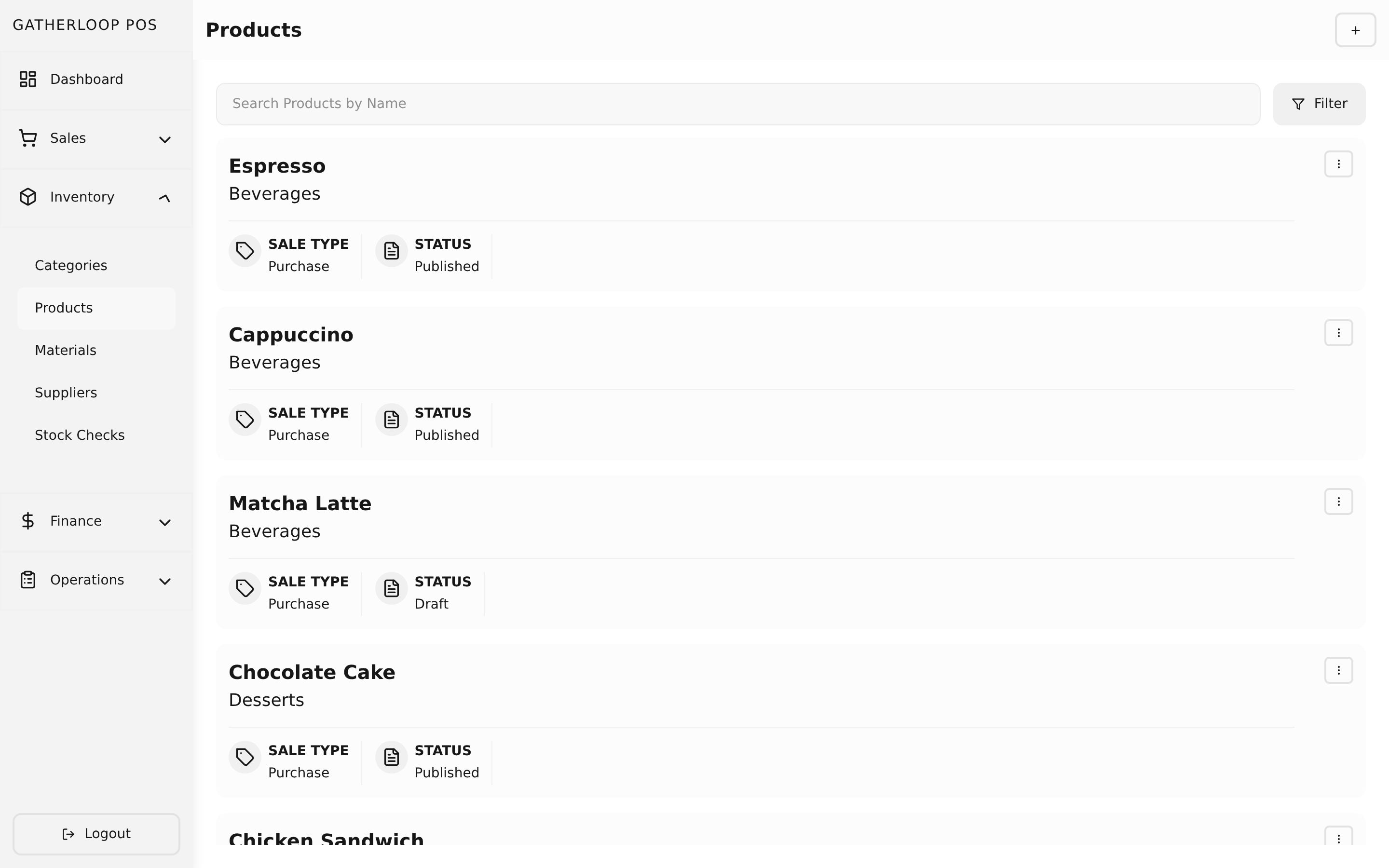
- Sale type —
purchasefor a normal priced item, orrentalfor a board-game rental, which switches its variants over to hourly/all-day pricing tiers instead of a flat price. - Status —
draftorpublished. A draft product is fully editable in the catalog (build out its variants, bills of materials, and pricing) but is hidden from the checkout screen until a manager flips it to published — so a new menu item can be set up completely, at leisure, before it's ever offered for sale.
Why it matters
Splitting "the thing on the menu" from "the thing that's priced and costed" is what lets one product represent a whole family of choices without duplicating its name, description, and photo four times over. "Iced Latte" is one product with a "Size" option; Small, Medium, and Large are three variants underneath it, each free to have its own price and its own bill of materials (a large drink uses more milk).
Splitting description from recipe protects customers from an internal detail leaking onto their phone. Before this split, staff wrote preparation steps straight into the description field a customer would eventually see; now the two are separate fields with separate audiences, and the recipe is never part of any public API response.
The draft/published split also protects the sales floor from half-finished setup: a manager building out next month's seasonal drink doesn't have to race to enter every variant, price, and recipe in one sitting — the draft stays invisible at checkout until it's genuinely ready.
Screenshot
Key capabilities
- Name, description, photo, category — the customer-facing identity of the item. Description is a single-line plain-text field (max 160 characters, no line breaks) — it's what a table-ordering guest sees on the menu card and item detail sheet.
- Recipe (staff-only) — a separate Markdown field for internal preparation steps, edited in its own "Recipe" tab on the product form. Never returned by any public API response.
- Options & values define variation — a product declares options like "Size," each with values like "Small"/"Large"; variants pick one value per option to become a concrete, sellable item. Option value names are also searchable in the table-ordering menu, which is a good reason to name them the way a guest would say them ("Earl Grey," not an internal code).
- Sale type: purchase vs. rental — a structural flag that determines whether the product's variants are priced with a flat price or with duration-based pricing tiers.
- Draft vs. published status — draft products are fully editable but excluded from the checkout item picker; publishing is the one action that makes an item sellable.
- Variants managed inline — the product edit screen embeds its full list of variants, so staff move between product-level details and variant-level pricing/recipes in one place.
For engineers
- Screens:
libs/ui/src/presentation/screens/ProductListScreen.tsx,ProductCreateScreen.tsx,ProductUpdateScreen.tsx,libs/ui/src/presentation/components/products/ProductFormView.tsx - Entity:
libs/ui/src/domain/entities/Product.ts - Backend:
apps/api/domain/product_entity.go,product_usecase.go recipecolumn, migration000022_add_product_variant_recipe, and the public-transformer strip that keeps it out of/public/*responses:apps/api/presentation/restapi/product_transformer.go(ToApiProductvs.ToPublicApiProduct)- Draft status design:
docs/prd-product-draft-status.md - Recipe/description split design:
docs/prd-order-app-ux-improvements.md