Operational Checklists
What it does
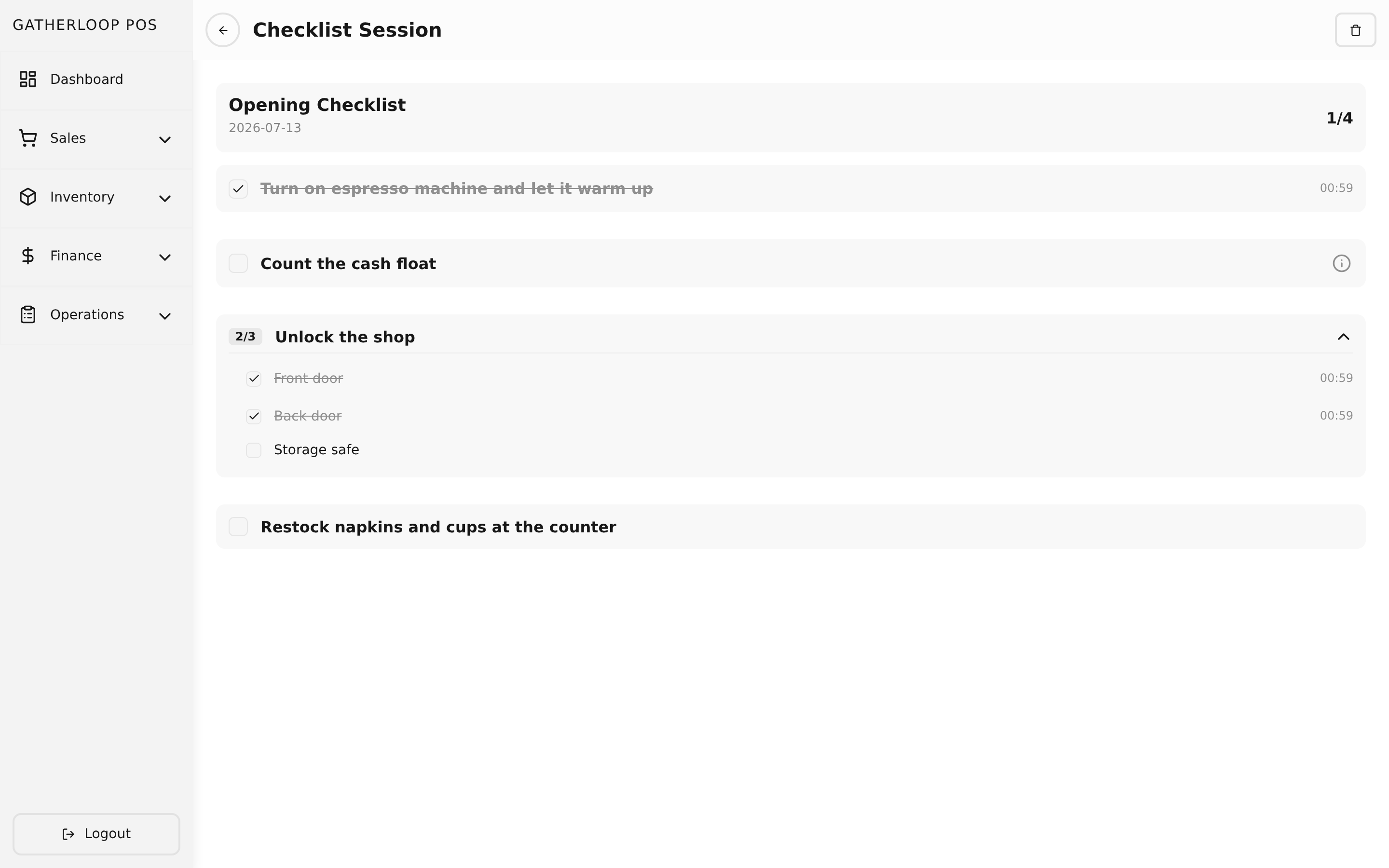
A checklist has two layers: a template and a session. A template is the reusable blueprint — "Opening Checklist," "Closing Checklist," "Weekly Cleaning" — built from a list of items, and any item can be broken down further into sub-items when a step genuinely needs to be checked off piece by piece (e.g. "Lock up" → front door, back door, safe). A session is one dated run of a template — "Opening Checklist for July 13" — created by picking a template and a date; the system copies every item and sub-item onto the session at that moment, and staff work through it by tapping items to check them off.
Items with sub-items can't be checked directly — only their sub-items can — and completion cascades automatically: check the last sub-item and its parent item completes itself, complete the last item and the whole session marks itself done, timestamped to the minute. Unchecking reverses the same cascade. A template's name and every item and sub-item description can carry Markdown, so a step like "Check refrigerator temperature" can link to the exact target range and what to do if it's out of spec, without needing a separate item for every clarification — descriptions stay tucked behind a small info toggle so the checklist itself stays scannable during a real walk-through.
Why it matters
Opening and closing a shop involves the same dozen-odd small tasks every single day, and the risk isn't that staff don't know them — it's that under time pressure, one gets skipped and nobody notices until it's a problem (the register float is off, the walk-in door was left unlocked). A checklist session turns "we're pretty sure we did everything" into a record: exactly which items were done, in what order, and at what time, for that specific date.
Templates and sessions are deliberately kept separate so that editing a template — adding a new step, rewording an instruction — never rewrites what already happened. Each session is a frozen copy of the template at the moment it was started, the same snapshot discipline used by stock checks: last Tuesday's opening checklist still shows exactly what last Tuesday's template said, even if the template has since changed. And because only one session can exist per template per date, there's never ambiguity about "which run of today's opening checklist is the real one."
Screenshot
Key capabilities
- Templates built from items and sub-items — each item can stand alone (directly checkable) or expand into sub-items (checkable individually, with the parent completing only once every sub-item is done); items and sub-items are reordered with simple up/down controls.
- Markdown descriptions, collapsed by default — a template, an item, or both can carry detailed instructions that stay hidden behind an info toggle until someone taps it, so a checklist with rich guidance still reads as a short list of tasks.
- One session per template per date — starting a session just means picking a template and a date; the system copies the template's current items and sub-items onto it as a fresh, independent snapshot.
- Cascading completion — checking the last sub-item completes its parent item; completing the last item completes the whole session and timestamps it; unchecking anything reverses the cascade the same way, all the way up.
- History-safe templates — editing a template later never changes sessions that already ran from it; deleting a template preserves every session that was ever started from it.
- Live progress at a glance — a session shows a running "completed / total" count, and the session list shows the same count per session plus a Done / Pending status chip, filterable by status.
- Searchable, paginated template list — templates are found by name, each row showing its item count and a preview of its description.
For engineers
- Screens:
libs/ui/src/presentation/screens/ChecklistTemplate{List,Create,Update}Screen.tsx,ChecklistSessionListScreen.tsx,ChecklistSessionDetailScreen.tsx - Components:
libs/ui/src/presentation/components/checklistTemplates/{ChecklistTemplateList,ChecklistTemplateListItem,ChecklistTemplateFormView}.tsx,libs/ui/src/presentation/components/checklistSessions/{ChecklistSessionList,ChecklistSessionFormView,ChecklistSessionExecution,ChecklistSessionItemRow,ChecklistSessionSubItemRow}.tsx - Entities:
libs/ui/src/domain/entities/ChecklistTemplate.ts,ChecklistSession.ts - Backend:
apps/api/domain/checklist_template_{entity,usecase}.go,checklist_session_{entity,usecase}.go; routes inapps/api/presentation/restapi/checklist_template_route.go,checklist_session_route.go - Web routes:
apps/pos-web/src/pages/checklist-templates/{index,create,[checklistTemplateId]}.tsx,apps/pos-web/src/pages/checklist-sessions/{index,[checklistSessionId]}.tsx - Design docs:
docs/prd-operational-checklist.md(data model, templates vs. sessions, the full v1 scope),docs/plan-operational-checklist-improvement.md(Markdown descriptions and progressive disclosure to keep checklists from becoming bloated) - Related: Stock Checks for the same frozen-snapshot pattern applied to inventory counts