Purchase Lists
What it does
A purchase list is what to buy, computed automatically from one stock check — there's nothing to fill in by hand. For every counted material, the system compares the frozen current stock against that material's frozen minimum stock: if the count is at or below the minimum (and the material actually has a real reorder policy configured), it's added to the list at the quantity needed to bring it back up to normal stock, priced from the material's own cost.
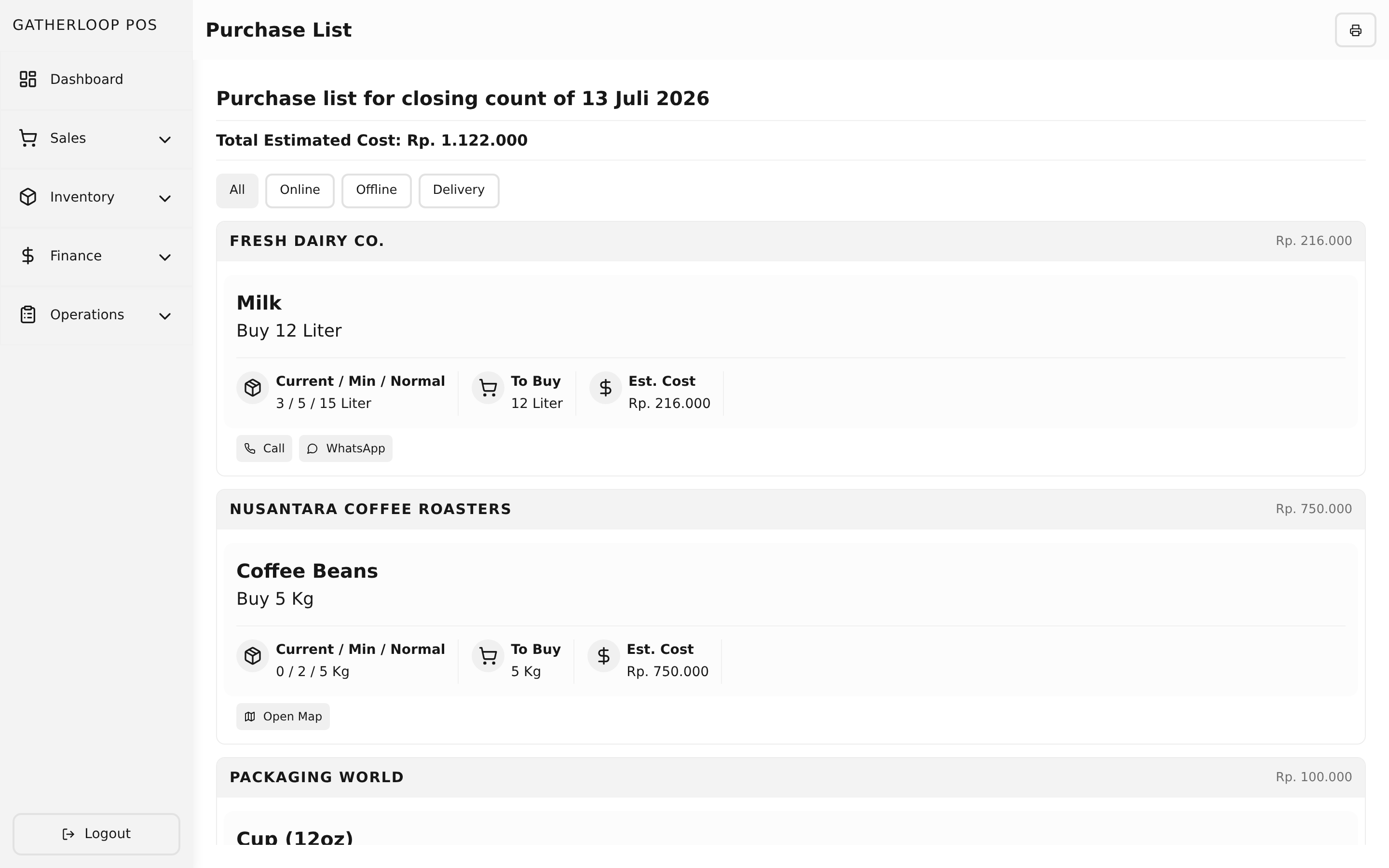
The list isn't a flat table — it's grouped by supplier, one section per supplier, so a person can work through it one stop at a time: everything to buy from Supplier A, then everything from Supplier B. A material sourced from more than one supplier simply appears in more than one section. Materials with no linked supplier land in their own "Unassigned" section with a direct link to go fix that on the material's page. Each row carries an action button suited to how that supplier is actually reached — open their online store, open their location on a map, or call/WhatsApp them — and the whole list can be filtered down to just Online, Offline, or Delivery purchases.
Why it matters
"What do we need to buy" and "how do we actually buy it" used to be two separate steps — read the numbers off a stock check, then dig up each supplier's phone number or storefront link from memory or a chat thread. Grouping by supplier with a one-tap action per row collapses that into a single screen a shift can work through top to bottom, whether that means placing three online orders before opening or making one supplier run and calling in a delivery from the car.
Because the whole thing is computed from a stock check's frozen snapshot rather than the live material table, a purchase list never silently changes after the fact — editing a material's price or reorder policy next week doesn't retroactively rewrite what last week's list said was needed, and the total at the top always reflects exactly what that stock check called for.
Screenshot
Key capabilities
- Fully computed, nothing to author — reached from a stock check's menu (View Purchase List); there's no separate purchase-list data to create or maintain.
- Simple, transparent threshold rule — a material is on the list only when its counted stock is at or below its minimum and its normal stock is genuinely above that minimum; materials without a configured policy are silently skipped rather than showing a meaningless recommendation.
- Grouped by supplier, alphabetically — one section per supplier, each with its own running subtotal, so the crew can work supplier by supplier.
- "Unassigned" section — materials with no linked supplier still show up (never hidden), with a one-click way to jump to the material and link one.
- Per-row action matched to purchase type — Online opens the supplier's order URL in a new tab; Offline opens their map location (falling back to a map search of their address if no map link is set); Delivery offers both a phone call and a WhatsApp deep link.
- Filter by purchase type — a segmented All / Online / Offline / Delivery control narrows the list to just the channel a person is currently working; the total updates to match.
- Cost total that counts each material once — the top-line estimated cost sums every material a single time, even though a multi-supplier material may render in several sections.
- Empty state built in — when nothing needs restocking, the screen says so plainly instead of showing a blank table.
For engineers
- Screen:
libs/ui/src/presentation/screens/PurchaseListScreen.tsx - Components:
libs/ui/src/presentation/components/purchaseLists/PurchaseListView.tsx,PurchaseListGroupedView.tsx - Entities:
libs/ui/src/domain/entities/PurchaseList.ts - Backend:
apps/api/domain/stock_check_entity.go,stock_check_usecase.go(purchase-list computation lives alongside the stock check domain — there is no separate persisted table) - Web route:
apps/pos-web/src/pages/stock-checks/[id]/purchase-list.tsx - Design docs:
docs/prd-inventory-management.md(the min/normal threshold calculation),docs/prd-inventory-purchase-suppliers.md(supplier grouping, filters, action buttons) - Related: Stock Checks for the snapshot this is computed from, Suppliers for what powers each section