Transactions
What it does
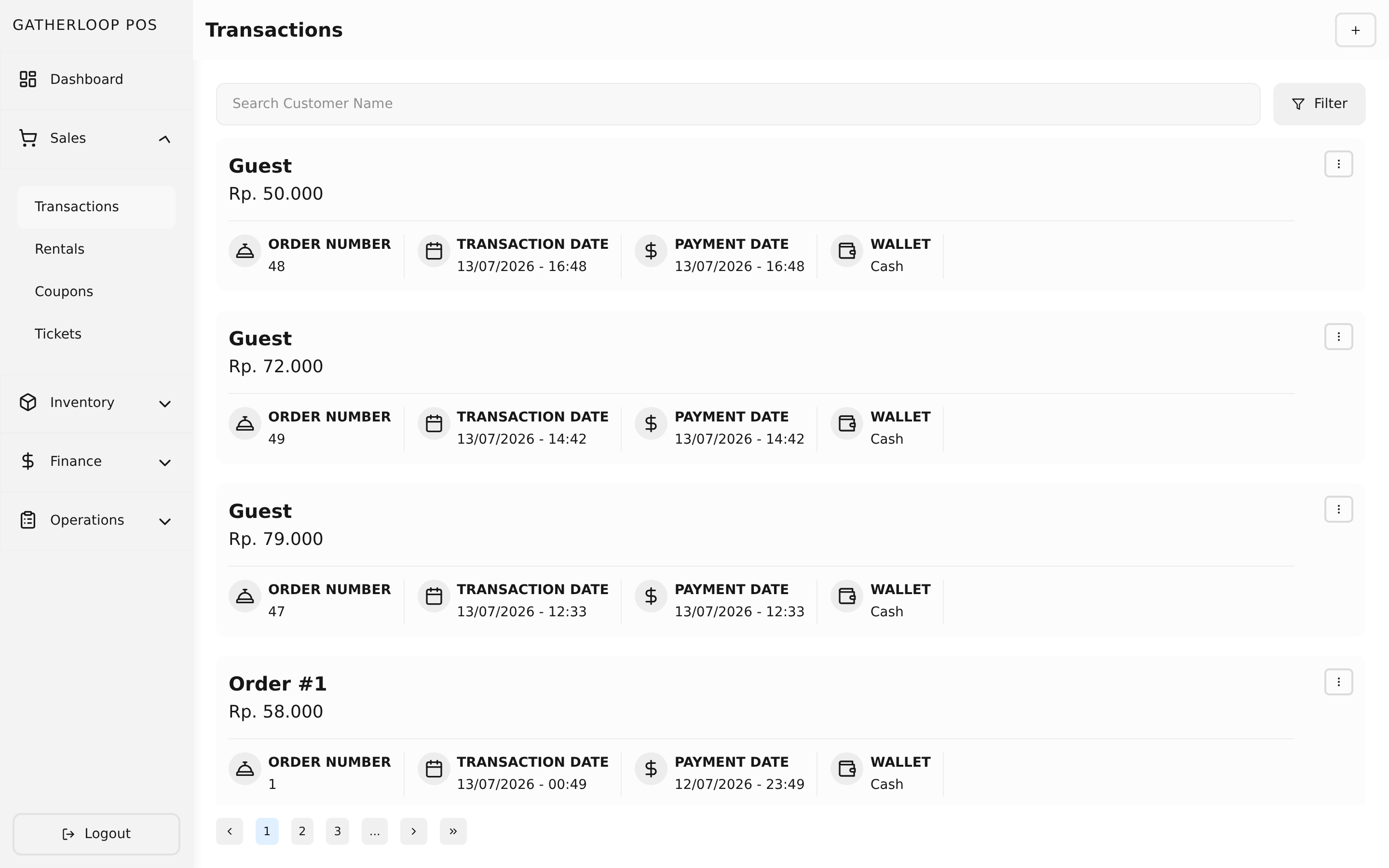
Transactions are the cart-to-receipt checkout flow — the screen staff use for every sale at the counter.
Staff search the catalog and add items to a cart, each as a specific product variant (size, flavor, or whichever options the product defines) with a quantity and an optional note or per-line discount. Coupons can be applied either to the whole cart or to a single line item. Once the cart is right, checkout opens a payment step: pick a wallet (cash or a cashless method), enter the amount paid, and the system works out the total and any change. On successful payment, staff are offered a printed invoice for the customer and, separately, a station order slip routed to the bar and/or kitchen.
Past transactions stay editable — a manager can reopen one later to attach a coupon or fix a line, without re-keying the whole sale.
Verifying a COD Order
A Cash on Delivery order arrives on this list already made by the guest, but not yet made by the bar: its row carries an amber Needs confirmation badge instead of the usual Preparing/Ready one, and its row menu is trimmed down to a single item, Verify — Pay, Mark as Ready, Delete and Print Order Slip are all hidden, since there's nothing to charge or make yet and nothing to hand over if the barista can't confirm the guest is actually there.
Tapping Verify opens a sheet with the guest's name, table, items and total alongside the photo they took at checkout — the same information a barista would want before walking to a table. Two buttons: Approve, which turns the order into a normal Preparing one (badged COD · unpaid until it's paid) and buzzes the bar to start making it, and Reject, which asks for one confirmation ("Reject order #12? The guest's order will be cancelled.") before cancelling the order outright — the guest's own status page immediately shows it was declined, and the row disappears from this list. An order nobody looks at within the confirmation window (15 minutes by default) expires on its own the same way an unpaid cash order does, freeing the guest's cart. Once approved, the order behaves exactly like any other unpaid order-app sale — Pay, Mark as Ready and Print Order Slip all come back, and a guest who never returns to collect it is simply delivered to their table and paid there through the ordinary Pay flow.
Why it matters
This is where the rest of the product earns its keep. A sale here isn't just a till entry — it draws its price and cost straight from the Catalog, and the moment it's paid it feeds the Finance dashboard automatically. Nobody re-enters a sales total into a spreadsheet at the end of the day.
Splitting the receipt into a customer invoice and a station order slip also solves a real floor problem: the person on espresso doesn't need to see line-item pricing, and the kitchen and the bar each need to know what the other one still owes the customer, not just their own half of the order.
Screenshot
Key capabilities
- Search-driven cart — find a product, choose its variant (e.g. size/option), set a quantity, and add it to the cart; each line can carry its own note and discount.
- Two coupon placements — apply a coupon to the whole transaction total, or to a single line item, side by side in the same screen. See Coupons for how the math works.
- Wallet-based payment — choose from any wallet marked as a payment target (cash or cashless), enter the paid amount, and the system computes change.
- Printed invoice — an itemized receipt for the customer, generated on successful payment.
- Station-routed order slip — a single combined slip whose items are grouped into Bar and Kitchen sections (by the product's category), so each station sees the full order and can tell whether the other side still owes the customer something. Items that belong to neither station (like a board-game ticket) are left off the slip entirely.
- Editable history — reopen a past transaction to adjust items or attach a coupon after the fact, from the transaction list and detail screens.
- Find a transaction by its daily number — every transaction gets a short number (
#42) that resets to1at the start of each business day and is shown on the list, the detail screen, and both printed documents. Typing a number into the transaction search box matches it directly, on any date, alongside the existing name search — the fastest way to find the transaction behind a slip a customer or station is holding. - Pager number, kept separate from the transaction number — the Pager Number field (labelled "Order Number" until a recent rename) is the physical buzzer handed to a walk-in customer, not an identifier: it's optional, gets reused across the day as pagers come back, and is always
0for order-app and rental checkouts. Use the transaction number to find a sale; use the pager number only to know which buzzer to collect. - Dining Option — Dine In or Takeaway — a two-segment control right under Pager Number, preselected to Dine In. Choosing Takeaway and saving shows a purple Takeaway badge (with a shopping-bag icon) on that row in the list — for a counter sale or an Order App one alike — and a dine-in row shows nothing extra. Editing a transaction prefills whichever option it already has, so a guest's own checkout choice survives a cashier reopening it, and the table a takeaway order was placed from still shows in the footer exactly as a dine-in order's does.
- Rental-aware editing — transactions created from a board-game rental checkout keep their calculated ticket price protected: editing the transaction later never silently re-prices a rental line from a catalog price.
- Fulfilment status for order-app transactions — an Order App sale carries a Preparing or Ready badge next to its Source badge, on both the list row and the detail screen. It's the barista's answer to "is this guest's order done", and it only ever appears on order-app rows — a counter sale is paid and handed over in one interaction, so it has no preparation window to track.
- Two ways to mark an order ready — Mark as Ready from a row's menu, or the primary button on the transaction's detail screen after checking the items against what was made. Both open the same confirmation, and both can be undone with Mark as Preparing if it was a mis-tap. Marking an order ready is what flips the guest's own status page to the pickup screen — see Order Fulfilment Status, After Payment.
- Refresh without reloading the page — the refresh button next to + on the transaction list pulls the latest transactions for the page you're on, keeping your search, filters and page number. Tap it to pick up orders guests just placed from the Order App instead of reloading the browser.
- Filter the list down to what's outstanding — the same filter popover as Source and Payment Status adds a Fulfilment filter (All / Preparing / Ready); picking Preparing or Ready also switches Source to Order, since the filter only ever means something for order-app rows. Filtering to Preparing is the list a barista checks before closing the bar — every guest order still owed.
- A COD order can't be paid, made or deleted before it's verified — Pay, Mark as Ready and Delete are hidden on its row until a barista approves it from the Verify sheet, enforced server-side so the menu is only ever an affordance, never the actual rule.
- COD · unpaid, at a glance — once approved, the row carries the usual Preparing/Ready badge plus a COD · unpaid one, so a barista can spot which ready orders still need a cashier's Pay before the guest walks off with them.
For engineers
- Screens:
libs/ui/src/presentation/screens/TransactionCreateScreen.tsx,TransactionUpdateScreen.tsx,TransactionListScreen.tsx,TransactionDetailScreen.tsx - Checkout & payment logic:
TransactionCreateHandler.tsx, theuseTransactionPayControllercontroller - Printing:
libs/ui/src/utils/print.ts(buildOrderSlipPayload, invoice/order-slip/checkin-slip payloads) - Backend:
apps/api/domain/transaction_usecase.go - Fulfilment badge and menu actions:
libs/ui/src/presentation/views/components/transactions/{TransactionListItem,TransactionDetail}.tsx; the confirm-and-act state machine isTransactionCompleteUsecase(libs/ui/src/domain/usecases/transactionComplete.ts), shaped likeTransactionUnpayUsecase - Fulfilment filter:
getFulfillment/setFulfillmentonTransactionListQueryRepository(libs/ui/src/data/url/transactionListQuery.ts), threaded throughTransactionListUsecase - Backend complete/uncomplete:
PUT /transactions/{transactionId}/completeand.../uncomplete(apps/api/presentation/restapi/transaction_route.go), guarded inTransactionUsecase.CompleteTransaction/UncompleteTransactionto order-sourced, not-already-completed transactions (apps/api/domain/transaction_usecase.go) - Design doc:
docs/prd-daily-transaction-number.md— why the number is a per-business-day sequence rather than the database id (D1), the counter-table allocation scheme (D4), and why the printed payload still carries the legacyorderNumberwire key until the external printer service shipspagerNumbersupport (D12) - Design doc:
docs/prd-order-fulfillment-status.md— why fulfilment is a nullablecompleted_attimestamp rather than an enum (D1), why it's scoped tosource = 'order'(D2), and how the same data serves a future kitchen display with no migration (D21) - Dining option: the form control is
SegmentedControl(libs/ui/src/presentation/views/components/base/Form/SegmentedControl.tsx), bound totransactionFormSchema.diningOption; the list badge isTakeawayBadgeinTransactionListItem.tsx. Stored astransactions.dining_option(dine_in|takeaway,NOT NULL DEFAULT 'dine_in'), set byRepository.CreateTransactionwhen a client omits it. - Design doc:
docs/prd-dine-in-takeaway.md— why the value lives ontransactionsrather than the cart or payment (Option C), why an update can't silently reset it back to dine-in (D6), and why only the non-default option is ever shown (D12) - COD badges and menu guards:
TransactionListItem.tsx'sNeedsConfirmationBadge/CodUnpaidBadgeand itsmenusarray, keyed offpaymentMethod === 'cod' && paymentVerificationStatus === 'awaiting' - Verify sheet and its state machine:
TransactionVerificationSheet.tsx(libs/ui/src/presentation/views/components/transactions/), driven byTransactionVerificationUsecase(libs/ui/src/domain/usecases/transactionVerification.ts,hidden → loading → shown → approving \| confirmingReject → rejecting → success \| error), wired inTransactionListHandler.tsx - Backend:
PaymentVerificationUsecase(GetVerification,Approve,Reject—apps/api/domain/payment_verification_usecase.go), routesGET/PUT /transactions/{id}/verification[/approve\|/reject](apps/api/presentation/restapi/payment_verification_{handler,route}.go), all staff-only; the photo itself is never in a guest-facing or list response (D14) - Design doc:
docs/prd-order-cod-payment.md— the POS-side FR-12, including why Pay and Mark-as-Ready are refused server-side whileawaiting(D9), and why an uncollected approved order is delivered to the guest's table rather than written off (D17)