Availability
What it does
Availability answers a question the catalog alone can't: is this item actually sellable right now? Every product and every variant carries two independent controls — a manual switch ("sold out" / "available") and an optional counter. A product declares, once, where the counter lives: None (no number at all, just the switch), Shared across variants (one count for the whole product), or Per variant (a separate count for each one).
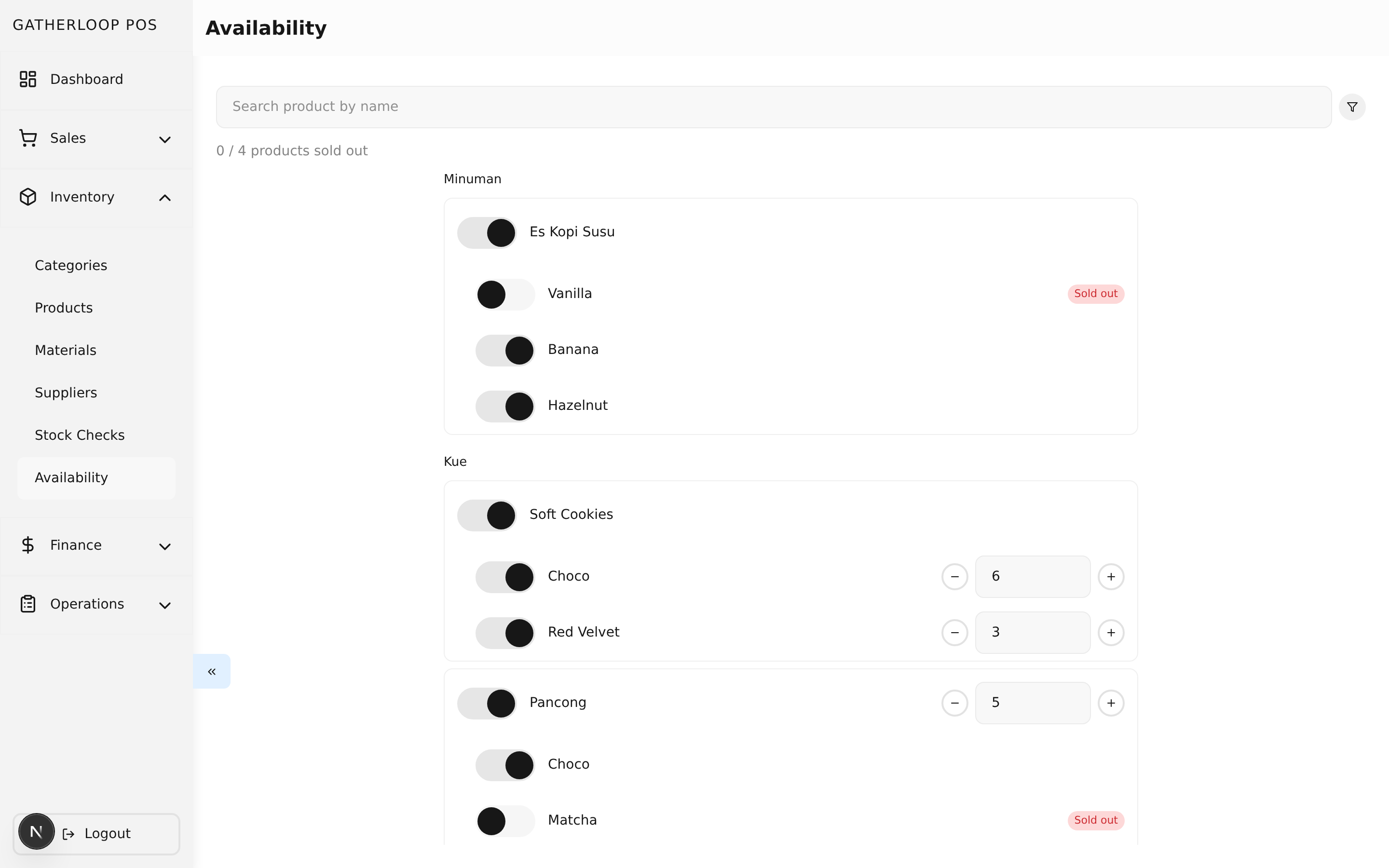
The Availability screen, reachable from the Inventory section of the sidebar, lists every published, purchasable product grouped by category, with a search box and a "Sold out only" filter. Each row shows the product's switch and — only when the product tracks a count — a stepper-and-input for the number left; each variant sub-row shows the same. Saving sends only the rows a crew member actually touched, so two people editing the screen at the same time never clobber each other's changes.
Once a variant is switched off, or its count reaches zero, it shows up as sold out everywhere a customer or cashier can see it — the POS item grid dims the tile and badges it "Sold out"; the order app dims the menu card and badges it "Habis". Neither app ever hides a sold-out item: the cashier still needs to find it to tell the customer it's unavailable, and the customer should be able to see it exists.
Why it matters
Coffee doesn't run out, but the vanilla syrup does. Soft Cookies are baked once in the morning in a known quantity. A single batch of Pancong dough serves three flavors, and losing the matcha topping doesn't mean the dough is gone too. Before this feature, the only tool for any of these situations was flipping the whole product to draft — which also hides every other flavor of that product, and vanishes it from the order app's menu entirely instead of showing it as sold out.
Availability gives the crew a switch for the "we're out of one thing" case (no number to maintain, no daily busywork) and a counter for the "we made exactly N of these" case — without conflating either with material stock counts. A Stock Check counts sacks of flour for next week's shopping list, snapshotted once a day; Availability counts what's left to sell, live, all day. Mixing the two would make both worse, so they share no vocabulary: Availability never says "stock" anywhere a crew member or a developer can read it.
Screenshot
Key capabilities
- A switch on every product and every variant, always present. Turning off Es Kopi Susu Vanilla — because the syrup ran out — takes effect on the next order-app menu load and leaves Banana and Hazelnut completely untouched. No number is ever required for this case.
- An optional counter, declared once per product. Soft Cookies tracks per variant — Choco starts the day at 6, Red Velvet at 3. Pancong tracks shared across variants — one count of 5 covers all three flavors, so two Choco and one Matcha take the shared count down to 2. The two mechanisms compose: Pancong can track 5 shared servings and have its Matcha variant switched off on a day the topping runs out, at the same time.
- The crew sets the day's numbers in one screen, in under a minute. Typing
5at opening is one gesture; tapping+1after a recount is another. Numbers carry over from the previous day — nothing resets overnight, so leftover cookies are still leftover cookies at 8am. - Sold out is never hidden. Both the POS grid and the order app menu keep showing a sold-out item, dimmed and clearly labelled ("Sold out" in POS, "Habis" for customers) — the opposite of what happens to a
draftproduct. - The customer's stepper cannot exceed what's left. When a variant's remaining count is known, the amount picker in the order app stops at that number and shows "Sisa n" once the customer reaches the cap — no scarcity theatre, no raw count shown anywhere else on the item.
- Blocked, not overridable. A sold-out product's tile can't be selected, and a sold-out option value's radio is disabled — a barista can't ring up an item the customer-facing order app would refuse. Fixing it is two taps back to the Availability screen.
- A resolved rule shared by both apps. Whether an item is sellable — and how many are left — is computed once, server-side, and shipped on every product and variant response, so the POS and the order app can never disagree about what's available.
For engineers
- Screen:
libs/ui/src/presentation/views/screens/pos/AvailabilityScreen.tsx, form:libs/ui/src/presentation/views/components/availability/AvailabilityFormView.tsx - Handler:
libs/ui/src/presentation/handlers/pos/AvailabilityHandler.tsx - Entities and resolution helper:
libs/ui/src/domain/entities/Availability.ts,libs/ui/src/utils/resolveOptionValueAvailability.ts - Backend resolution:
apps/api/domain/availability_entity.go,availability_usecase.go,availability_reservation.go(decrement/release at transaction creation, deletion, and order checkout) - Web route:
apps/pos-web/src/pages/availability/index.tsx; the product form's tracking selector lives in the sharedlibs/ui/src/presentation/views/components/products/ProductFormView.tsx - Design doc:
docs/prd-product-availability.md— the full model, the three real menu items it's built around, and whyStockCheckkeeps the word "stock" while this feature does not (D14, D15) - Related: Products for the tracking-level selector on the product form, Stock Checks for the separate material-counting feature this is deliberately not merged with